

Aurelis Master
Tone EQ, Glue Comp, Stereo Field, Harmonic Color and a true peak limiter in one window, driven by BS.1770 metering and an analysis engine that tells you what it measured, what it suggests and what the trade off is. Nothing moves until you say so.
VST3 · AU · CLAP · Standalone · Windows and Mac · Key issued at checkout
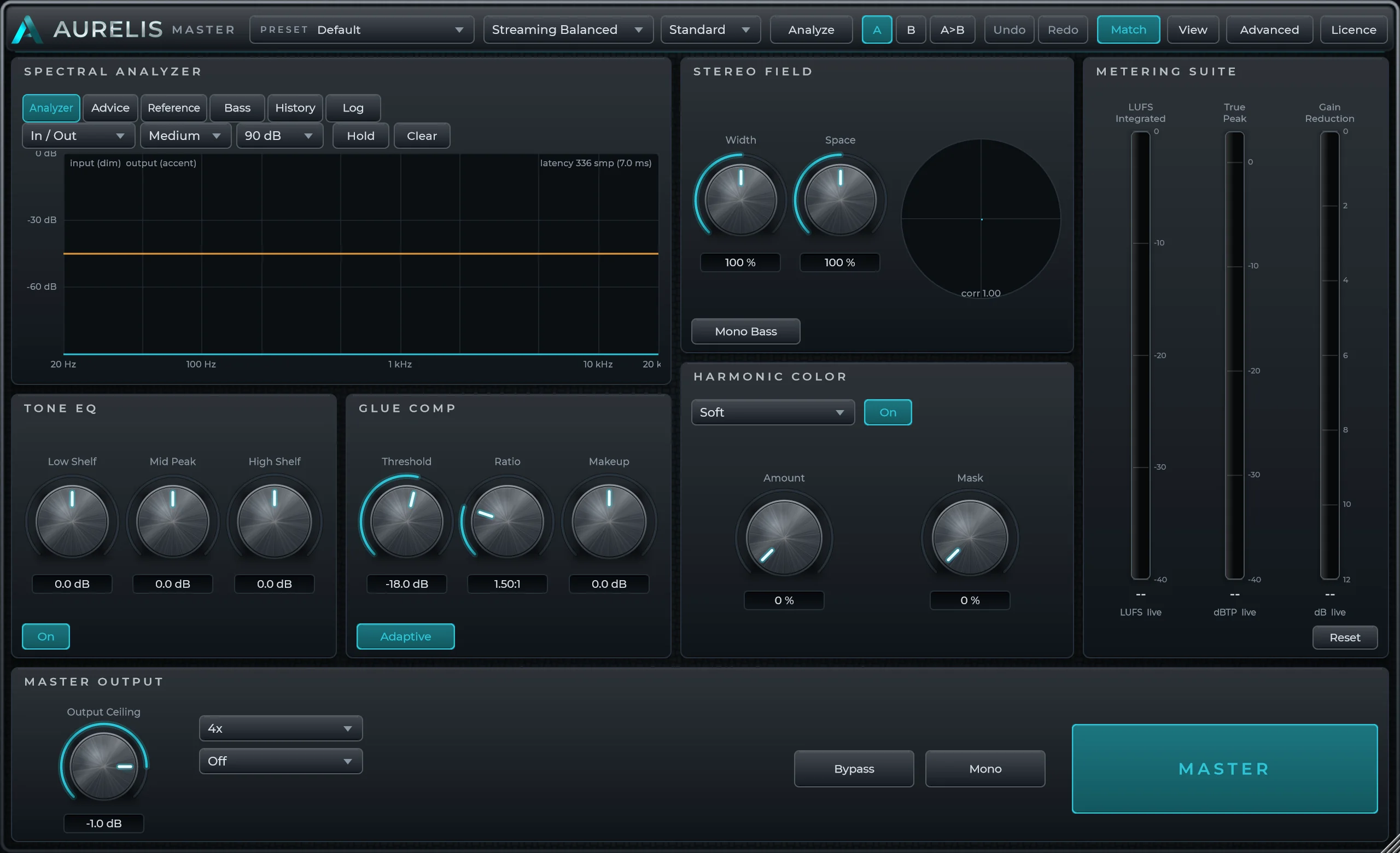
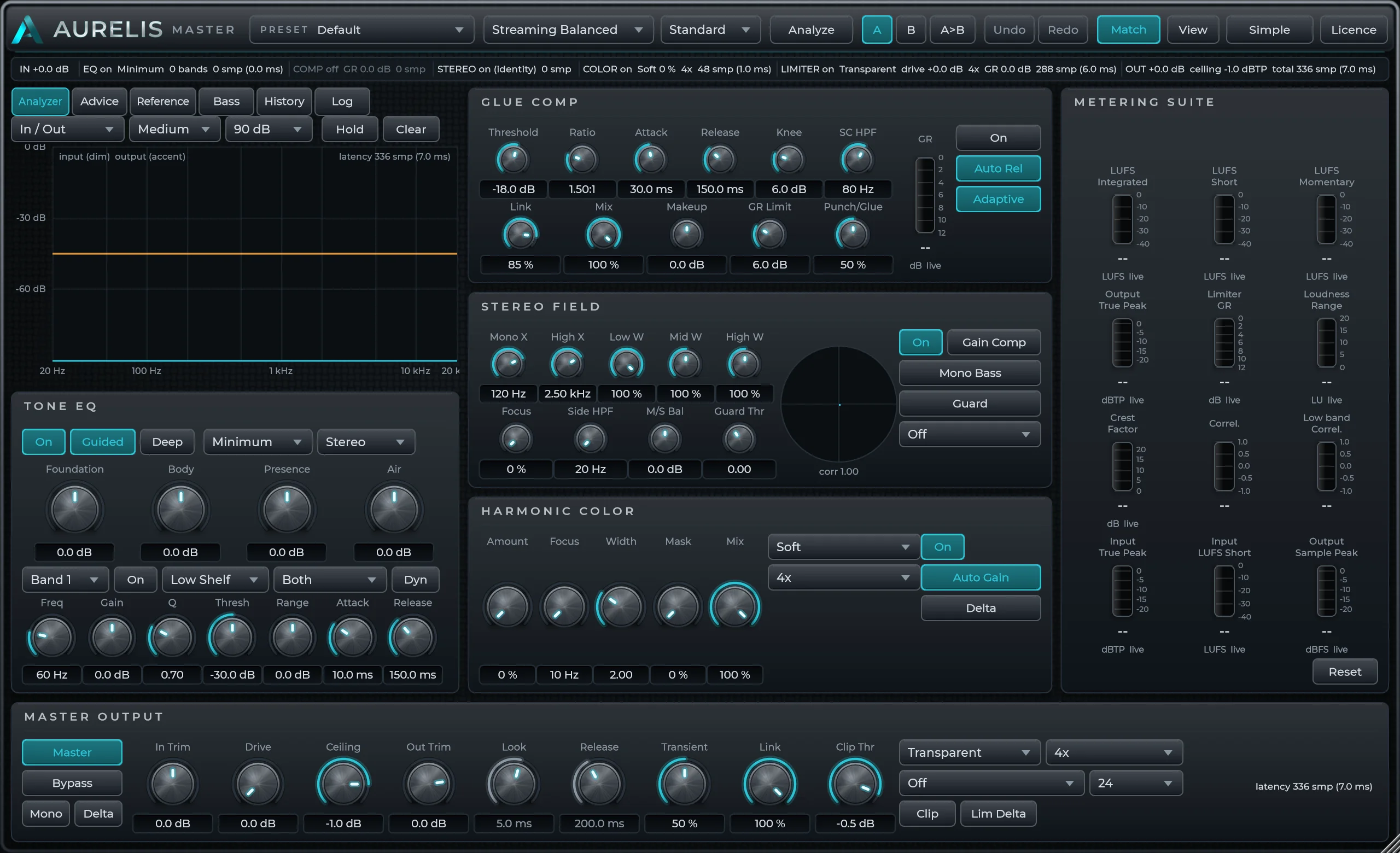
Built for producers, engineers and artists who want to make the last decision on a record with the numbers in front of them.
The signal path
Five stages. One latency. Zero surprises.
Every module switches with a 20 ms crossfade and none of them changes the reported latency, so bypass comparisons stay in time and your host never re-syncs. Scroll to follow the signal through the real interface.
Shape weight, presence and air without breaking the mix.
Eight bands, static or dynamic. A guided mode with four broad regions and a safety cap, or the full editor. Minimum, linear or mixed phase.
FIR designed on the message thread and adopted at the next block. Linear phase adds about 176 ms at 48 kHz.
Cohesion that keeps the movement and the impact.
Program dependent release, adaptive peak and RMS detection, a gain reduction limit and a Punch to Glue macro that moves attack and knee together.
Off by default. Inserting the plugin never compresses a good mix.
Width and space with mono compatibility in view.
Three band width with mono bass, centre focus, side high pass, gain compensated width and a correlation guard that judges the input, not its own output.
At unity everything nulls: the identity state is bit exact.
Dimension, density and character with a measured hand.
Seven shapers from Soft to Tape inspired at 2x to 16x oversampling, with focus, mask, auto gain and a delta button so louder never masquerades as better.
Zero amount is an exact pass through. A DC blocker follows every shaper.
Finish with transparent final stage control.
True peak limiter with five modes, oversampling to 16x, an optional clip stage, ceiling and trims, and TPDF or noise shaped dither to 16 or 24 bit.
Never lets a sample exceed the ceiling at the base rate. Dither may add one LSB.
Designed for decisions
Twelve controls when you want speed. Everything when you want control.
Simple shows the dozen controls most masters need. Advanced opens every band, every detector setting, the audition modes and the full metering suite. Both drive the same parameters, so switching never changes the sound.
- Spectral analyzerSee the balance before you change it: input dim, output in colour, with Reference, Bass and History tabs.
- Tone EQThree shelves in Simple, eight bands with dynamics and phase choice in Advanced.
- Glue CompThreshold, ratio and makeup, or the full detector with Punch to Glue.
- Stereo FieldWidth and space with the correlation meter and Mono Bass beside them.
- Harmonic ColorAmount and mask, or shaper type, oversampling, focus, auto gain and delta.
- Metering suiteLoudness, true peak and gain reduction, expanded to the full BS.1770 set in Advanced.
- Master outputCeiling in Simple. Modes, oversampling, clip stage, trims and dither in Advanced.
The analysis engine
Advice you can argue with.
Press Analyze after the loudest section and a quiet one. The engine captures the last thirty seconds of input and output and measures tone, dynamics, stereo and loudness against the delivery intent you chose.
A hypothesis, the expected benefit, the trade off, a bounded range and a confidence that is a statistic, the frame to frame spread of what the rule measured. A short or unstable passage is never reported as High.
The target rule states the gain needed, how much the headroom under the ceiling gives cleanly, how much would have to come from limiting and what that costs in crest factor. When the limiting would be destructive it refuses and recommends a mix revision.
After you accept a change the output is re analysed and shown before and after, with six interaction detectors watching for an EQ boost driving the limiter, widening against mono and the rest.
- Measured
- Side exceeds mid by 7.4 dB in the air band, stable across 27 frames.
- Hypothesis
- Widening or a bright reverb is adding sizzle that folds to nothing in mono.
- Benefit
- Tighter top end that survives phone speakers and club systems.
- Trade off
- Slightly narrower image above the high crossover.
Control room
Numbers you can hand to a broadcaster.
Integrated, short term and momentary loudness, loudness range, true peak, crest factor and correlation, plus a Bass Translation View and ten minutes of loudness history against your target.
2x to 16x where it matters
Colour and the limiter run oversampled, and the chain strip shows each module's oversampling, gain change and latency contribution. The total is reported to the host exactly.
Loudness matched bypass
Bypass, mono, mid, side, left, right, low band and high band solo, and a delta that plays only what changed.
Everything is undoable
Knob moves, preset loads, A and B recalls and accepted suggestions are each one step. Host automation groups into one second steps.
Three palettes
Standard, high contrast and colour blind safe. Warnings always carry text, never colour alone, and every control has a tooltip.
Measured before it was described
The numbers on this page come from the plugin's own test suite, which runs on every build.
Loudness calibration, ceiling compliance, exact latency, mid and side nulls, alias rejection, dither statistics, zero audio thread allocations.
Momentary, short term, integrated, gated and loudness range, every reading within the documents' tolerances.
The VST3 passes the full set. The Audio Unit passes Apple's auval in strict mode.
Presets and delivery intents
Start with intention.
Ten factory presets set the chain up for a purpose. A delivery intent tells the analysis engine what loudness and ceiling to reason against. Both are starting points, never locks.
Every control at its default. A clean starting point.
Gentle top end, a touch of glue and warmth, safe streaming ceiling.
Denser limiting for competitive streaming level without clipping.
Punchy limiter, solid mono low end, a little weight below 100 Hz.
Transparent, minimal gain reduction, dynamics preserved.
Tape inspired colour with a soft low shelf and open top.
EDM and bass music: mono sub, firm low shelf, punch mode limiter.
-23 LUFS, -1 dBTP, Safe limiter, 24 bit TPDF dither, no colour. Warns when the range or short term level would fail the spec.
-24 LKFS, -2 dBTP, Safe limiter, 24 bit TPDF dither, no colour. US television to the CALM Act.
Speech first: steadier level, presence lift, conservative true peak.
| Delivery intent | Integrated target | Ceiling | Limiter |
|---|---|---|---|
| Streaming Balanced | -12 LUFS | -1.0 dBTP | Transparent |
| Club Impact | -8 LUFS | -0.5 dBTP | Punch |
| Dynamic / Hi-Fi | -16 LUFS | -1.0 dBTP | Transparent |
| Demo / Reference | -12 LUFS | -1.0 dBTP | Punch |
| Broadcast | -23 LUFS | -1.0 dBTP | Safe |
| Podcast / Spoken Word | -16 LUFS | -1.5 dBTP | Safe |
Compatibility
What it runs on.
- Formats
- VST3, Audio Unit (Mac), CLAP, and a standalone application.
- Windows
- Windows 10 or 11, 64 bit. VST3, CLAP, standalone.
- Mac
- macOS 12 or later, universal binary for Apple silicon and Intel. VST3, AU, CLAP, standalone.
- Hosts
- Any host that loads VST3, AU or CLAP: Ableton Live, Logic Pro, Cubase, REAPER, Studio One, Bitwig, FL Studio and others.
- Sample rates
- 44.1 to 192 kHz. Ceiling compliance is tested at every rate and oversampling mode.
- Licence
- A key file in your name. No activation server, no account, no internet. Use it on the computers you own.
- Demo
- The full plugin. Until a key is loaded the output mutes for two seconds once a minute, with a fade. No time limit.
- Installers
- Not yet signed with a paid publisher certificate, so Windows and macOS show a warning on first run. Instructions are below. Signed builds will follow in an update.
From download to first master
Four steps.
Windows installer or Mac package. Both carry every format.
On Windows choose More info, then Run anyway. On a Mac use Open Anyway in Privacy and Security, then run the package again.
Insert it on the master bus, choose a delivery intent and press Analyze after the loudest section.
After purchase press DEMO in the plugin and pick the key file. The mute stops and stays stopped, on every format and host.
Try it, then own it
The demo is the plugin.
Download either build and use everything. Until a licence key is entered the output goes quiet for two seconds once a minute, with a fade so it never clicks. Buy a licence and you receive a key in your name on the spot; press DEMO in the plugin, load the key, done.
VST3, Audio Unit, CLAP and standalone, so any host that loads one of those: Ableton Live, Logic Pro, Cubase, REAPER, Studio One, Bitwig, FL Studio and others. There is no AAX build, so Pro Tools is not supported.
The demo is the full plugin with no time limit. The only restriction is a two second mute once a minute until a key is loaded, which is enough to master a track and hear every module but not enough to ship one.
One payment of 15 CAD. The key never expires and updates to version 1.x are included.
Yes. The key is tied to you, not to a machine. Use it on the computers you own, in every format and host. Keep it to yourself; it carries your name.
Simple view shows a dozen controls, the guided EQ works in four broad regions with a safety cap, and the analysis engine explains each suggestion and its trade off in plain words before you accept it.
The builds are not yet signed with a paid publisher certificate. On Windows choose More info, then Run anyway. On a Mac open System Settings, Privacy and Security, and press Open Anyway next to the package, then run it again. Everything it installs then loads without further prompts.
Checkout issues a key file signed for your name and email. The plugin checks the signature offline; there is no activation server and no account. Lost it? Have it resent from the link in the footer.
Support is by email at zayah@zayahb.com. Refund requests go to the same address and are handled through Stripe, which processed the payment.
Licence
- Windows and Mac, every format
- Key issued in your name, instantly, no activation server
- Use on the computers you own
- Updates to version 1.x included
- Taxes handled at checkout
Checkout by Stripe. Your key and both downloads appear the moment payment completes.
Hear the whole chain before you pay for it.
The demo is the full plugin. Master a track with it tonight, then buy the key when you are sure.
VST3 · AU · CLAP · Standalone · Windows and Mac · Secure checkout by Stripe